Run the whole factory from one system
ApexFactory is an ERP for manufacturers. Quotes, bills of materials, jobs, purchase orders, stock, dispatch and invoices live in one system, and the shop floor works from the same record as the office. Business intelligence sits on top of that data, and a customer portal is on the way.
What we make
Built for manufacturers, and for nobody else.
- Available
ApexFactory ERP
The system the business runs on.
Sales, engineering, production, purchasing, stock, dispatch and finance in one system. Every department works from the same record of every part, customer and order.
Explore the ERP - Coming soon
ApexFactory Portal
Your customers, serving themselves.
A website where your customers will look up their orders and place new ones. It reaches the ERP only through a narrow, versioned interface, and never touches the database.
About the portal - Available
ApexFactory Business Intelligence
Your ERP data, answering questions.
Reports and dashboards built on the data your ERP already holds, in Microsoft Power BI, SQL Server Reporting Services or Excel. Built to the questions you ask, not from a catalogue.
About business intelligence
Production and purchasing
Activate an order and the plan follows
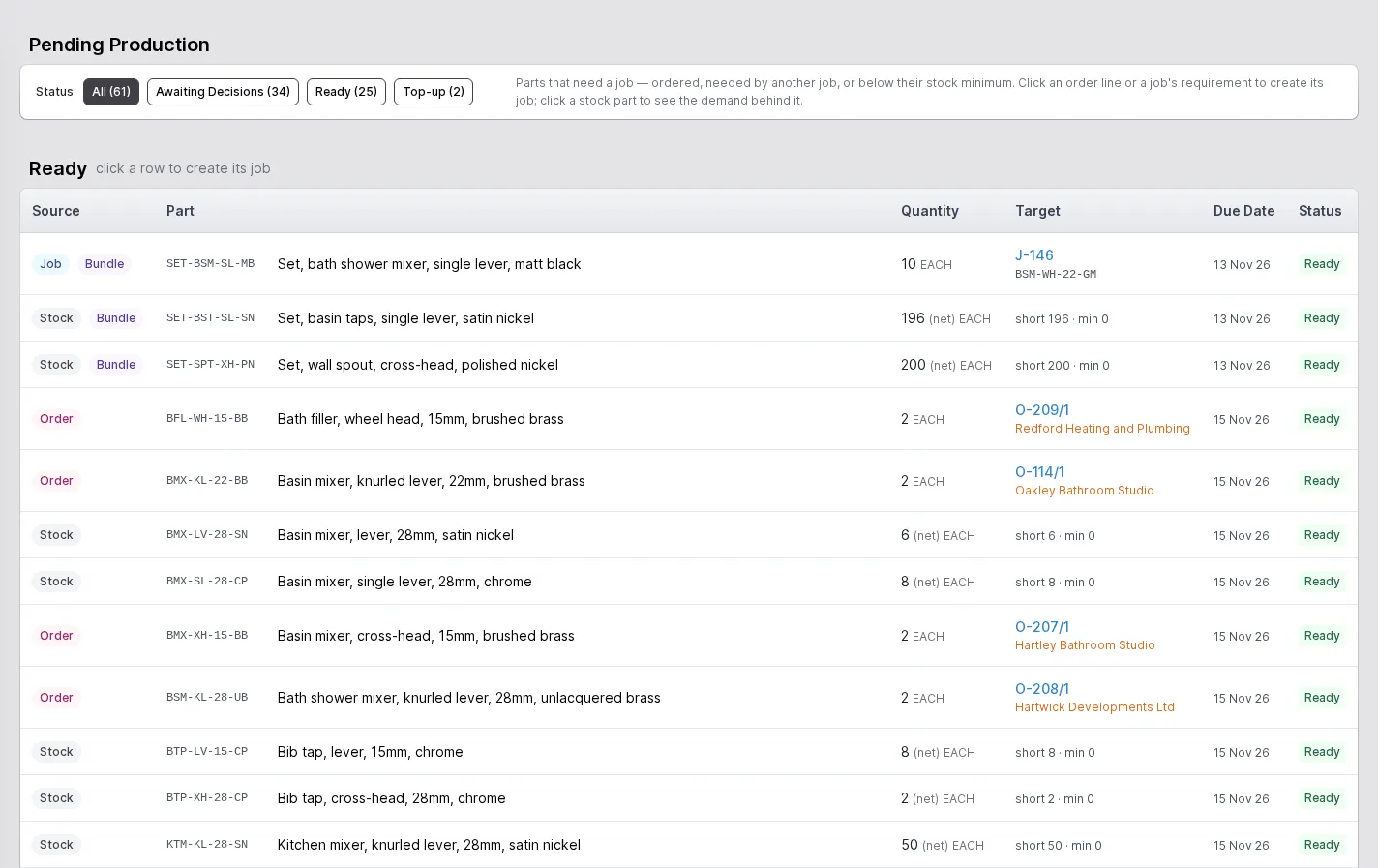
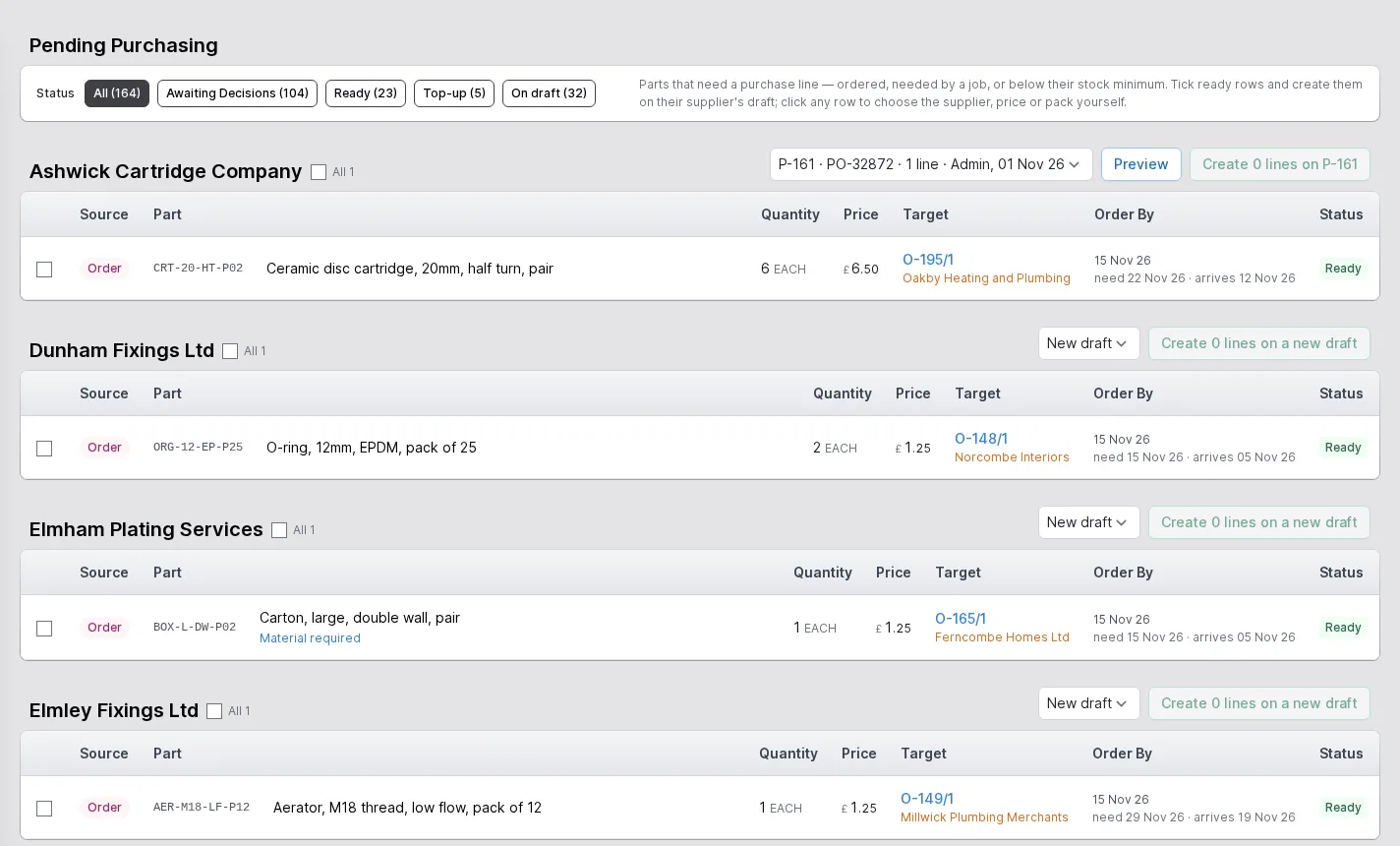
Activating an order works out the parts it needs. Production sees the parts that need a job. Purchasing sees the parts that need buying. Stock that is about to run short shows up in the same place.
Every row says where the demand came from and when it is due. One click turns it into a job or a purchase order line. Nobody re-types anything, and nobody plans from last week's spreadsheet.
- A pending screen for production and one for purchasing
- The source and the due date on every row
- Jobs and purchase lines made from the row itself
Inside the ERP
The ERP is organised the way a factory is. Each area has a page of its own, with the real screens.
- 01
Sales
Customers and prospects, quotations, orders, the sales-item catalogue and returns, in one record that follows the customer's order all the way to dispatch.
- 02
Engineering
Parts and how each is supplied, bills of materials, routings and the operations they are built from, with schedules that work back from the due date.
- 03
Production
Jobs and works orders planned from real demand, operations run at workstations, with timing, materials and quality issues tracked as the work is done.
- 04
Purchasing
Suppliers and the parts they sell, purchase orders raised from real demand, goods receipts against orders or straight onto a job, and subcontracting.
- 05
Stock
Warehouses, areas and bins, batches with ownership and purpose, forecasting by part, book in, relocate and stock counts.
- 06
Dispatch
Packages, dispatches and the carriers you use, with export paperwork and proof of delivery kept with each dispatch.
- 07
Finance
Invoices, pro-formas and credit notes, purchase bills, and standard costs rolled up from bills of materials and saved as snapshots.
- 08
Platform
Users and roles, a history of every change, editable document templates, custom fields, global search and to-do lists.
The shop floor
Operators get screens of their own
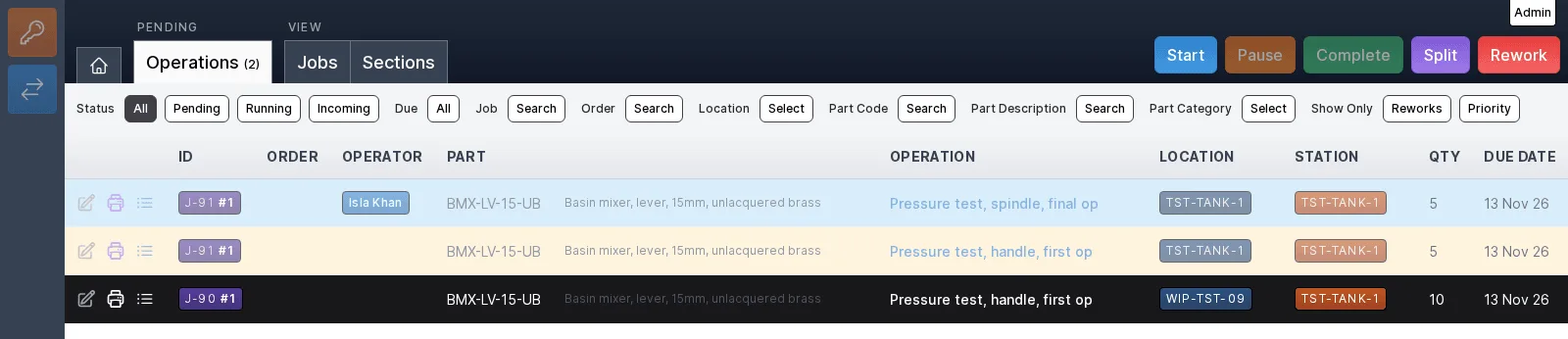
An operator does not need the office. Each workstation has a screen of its own: the work waiting at that station, and large buttons to start it, pause it and complete it.
A station shows only what it is set up to do, whether that is running operations, kitting materials, booking finished work into stock or counting it. An operator sees their own work and nothing else.
- Start, pause, complete, split and rework from the same row
- Operators are a separate kind of user and log straight into the workstation screens
- Who did what, and for how long, is recorded as the work happens
How it is built
The decisions underneath every screen.
One record, many desks
An order, its jobs, its purchases, its stock and its dispatch are the same records seen from different desks. Nothing is copied, so nothing has to be reconciled at the end of the month.
Every change has a name
Each change records who made it and when, as an event. Nothing is hard-deleted. You can always see what happened and who did it.
Access shaped like a factory
Roles say what each person may do. Operators get a focused interface of their own instead of the whole ERP.
Yours to shape
Add your own fields to parts, sales items and jobs. Edit the templates that print your quotations, works orders, dispatch notes and purchase orders.
Tell us what you make
We will show you the ERP on a product like yours and talk through what you would want it to do.